
Step 1: First step to add the appointment to your profile is to login into mentis.
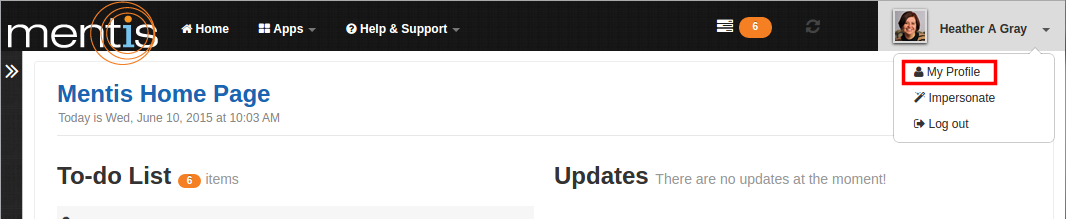
Step 2: Click on “My Profile” present in the drop-down menu of profile name on top right-hand corner of the webpage.
Step 3: Click on “Edit” present in “Appointments” under “About me”. You can also use “Please click here to add” present under “Biography” to add details about positions held in various organizations.

Step 4: In “New Appointments” you can add details in fields like “Duration”, “Title” and “Institution”. You can add details in “Duration” in month and year format. You need to select “Title” and “Institution” from the drop-down list or add manually. In “Institution” you can create a hierarchy by adding child unit using “+ Add child unit” present under “Institution”. You can hide details from public using “Hide from public”.
Note: While adding details about the duration of present appointment then you can use the check box “Present”. You can also delete the institution name using delete button present under “Institution”.
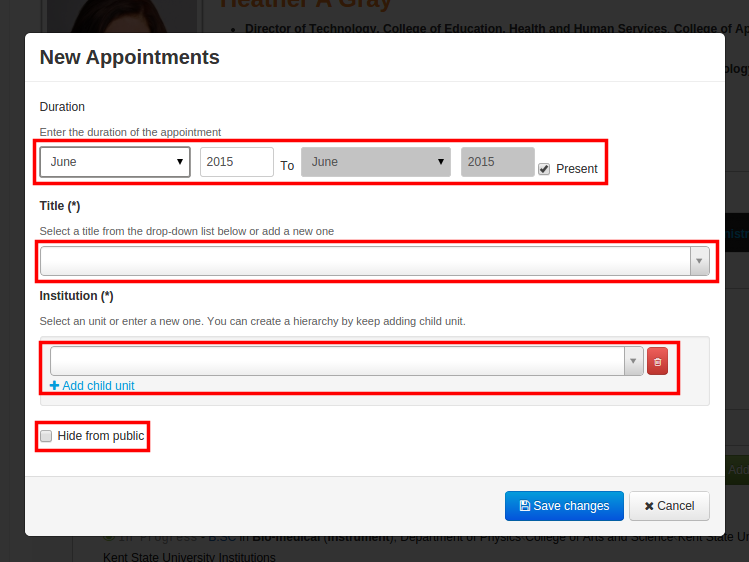
Step 5: Now click on “Save changes”. This would be displayed as your appointment for a particular duration.
Comments
0 comments
Please sign in to leave a comment.