
In “Other Creative Activities” section you would be adding those details about creative work which do not find place in other sections.
Step 1 : First step to add other creative activities is to login into mentis.
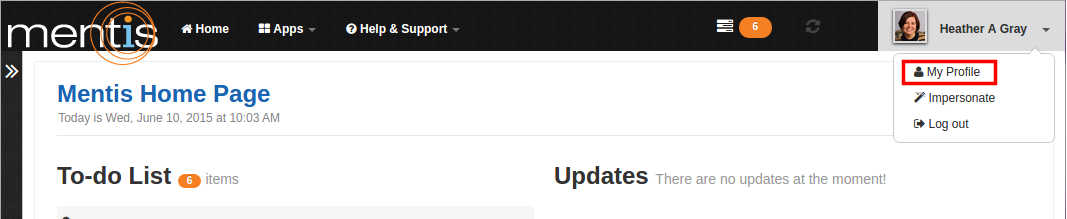
Step 2 : Click on “My Profile” present in the drop-down menu of profile name on top right-hand corner of the webpage.
Step 3 : Click on “Add new” present in “Other Creative Activities” under “Creative Activities”. You can also use “Please click here to add” link to add details. You can edit or remove details entered by using “Edit” button present on the right-hand side. You can also rearrange details entered by using “Rearrange” button present on right-hand side.

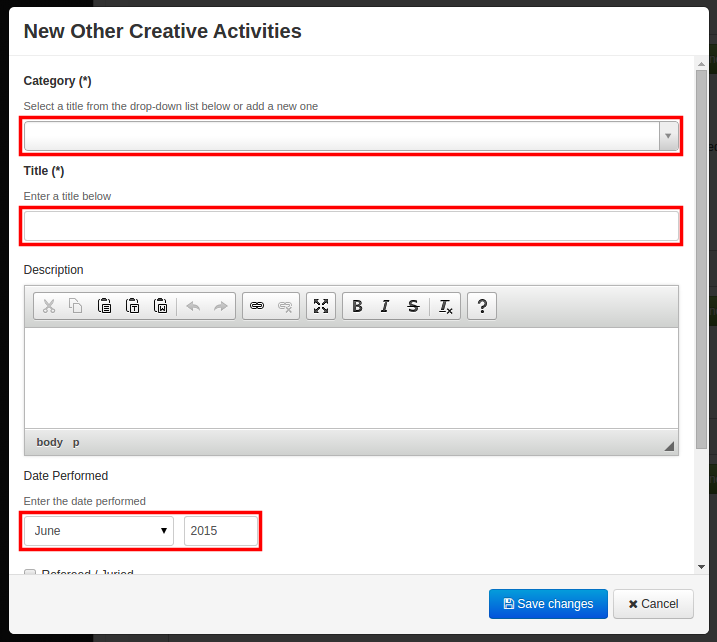
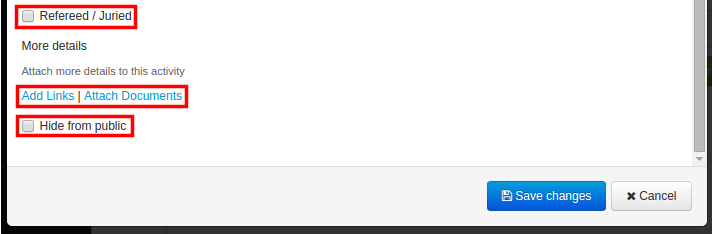
Step 4 : In “New Other Creative Activities” you need to add details in fields namely “Category”, “Title", “Description”, "Date Performed”. You can select category from the drop-down list or add a new one. You can copy and paste description from some existing source. In “Date Performed” you need to add date in month and year format. If the creative work is refereed or juried then you can use checkbox “Refereed/Juried”. For more details about your creative work you can add links or attach documents using links “Add Links” or “Add Documents”. You can hide details of particular creative work by using checkbox “Hide from public”.
Step 5 : Now click on “Save Changes”. This would be displayed as your other creative activity.
Comments
0 comments
Please sign in to leave a comment.