
1. You can signup for ELC completely online. To get started please visit this http://elc.inknowledge.com/signup.
2. On the Signup form, you need to enter your details as listed below
(1) First Name,
(2) Last Name,
(3) Email (official email),
(4) Organization Name (university or institution name) e.g. Hogwarts University,
(5) Subdomain (for example, if your website was hogwarts.edu, we would recommend selecting entering hogwarts in that field so that your selected domain reads as hogwarts.inknowledge.net),
(6) Password (please select a complex password which has both upper-case and lower case alphabets, numbers, special characters and is at least 8 characters in length.
(7) Re-Type Password.
Please complete the challenge to confirm that you are not a bot and check the tick box for the Terms of Service and Privacy Policy after having reviewed them.
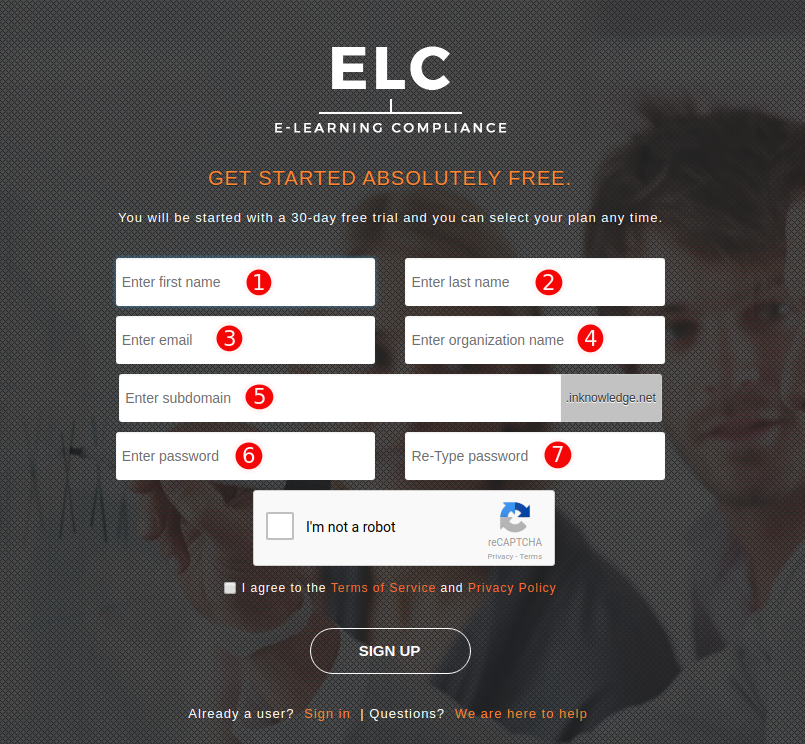
3. Click on the Sign-Up button to complete the process.
Note: A verification email would be generated at this stage and sent to the email provided by you in Step 2. Please complete the process and you can then start accessing the system.
You can now visit your customized login page at the subdomain selected by you to continue logging in to the system.
If you require any assistance with the signup or are unable to complete the process, please email us at support@inknowledge.com.
Comments
0 comments
Please sign in to leave a comment.