
Available Version Mentis 3.0.0 onwards
Mentis has pre-built roles that allow for providing different functionality to different users based on the roles they have been assigned. These roles also govern the different menu items that are visible to the user throughout Mentis. This article explains how a user can be assigned a role.
Important: Before assigning a role to the user, you should add the user.
Assigning a Role
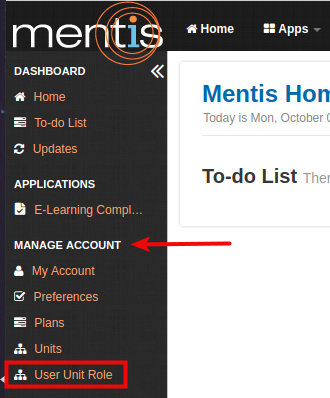
1. Select User Unit Role from the sidebar present under Manage Account.
2. Click on Add button present on the right-hand side.

3. In Create a new User Unit Role, you need to select a User (1), Unit (2) and Role (3).
Note: Unit is optional but when assigned limits the scope of the role where applicable to records belonging to a specific unit. For e.g. you can assign a user the role of the Program coordinator for a specific unit which will then only allow them to manage programs for that unit.
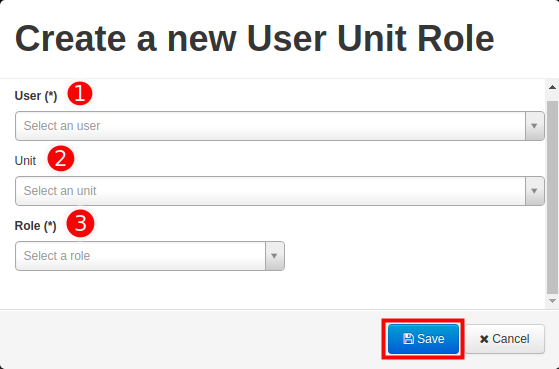
4. Click on Save to finalize the change.
Edit or Delete User Unit Role
1. You can edit or delete user unit role using the edit or delete button present under Actions.

Searching through User Unit Roles
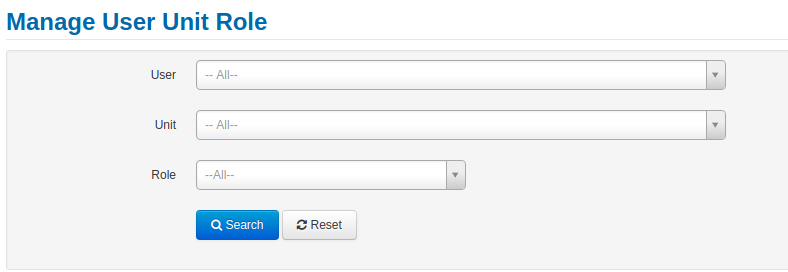
1. You can search for records in User Unit Role by using search options for user, unit and role.
Comments
0 comments
Please sign in to leave a comment.