
Program Coordinators can be assigned by ELC Admin or your Org Admin to specific units. Once assigned, Program Coordinators can manage the Programs for their unit as well as manage the authorization status for those programs. This allows you to delegate the responsibility of your state authorization process and its tracking to individuals in various departments on your campus.
Adding Program Coordinator through ELC App
Adding Program Coordinator
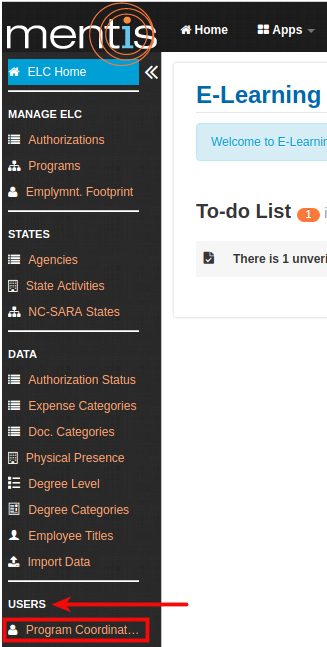
Once inside the ELC app, select Program Coordinators present under Users from the sidebar.
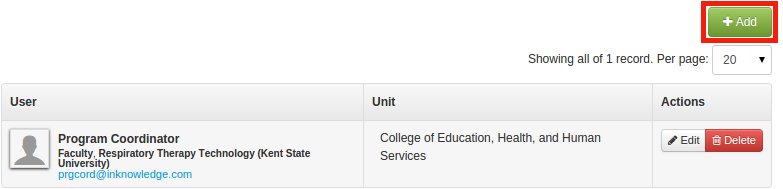
1. In Manage Program Coordinator, click on +Add present on the right-hand side.
2. In Add a new Program Coordinator, you need to enter and select a user (1) and unit (2) from the drop-down menu.
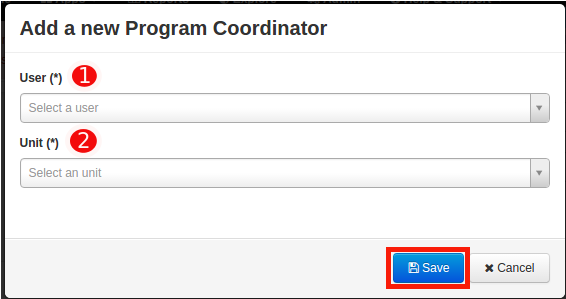
3. Click on Save. This will be displayed as Program Coordinator.
Manage Program Coordinator
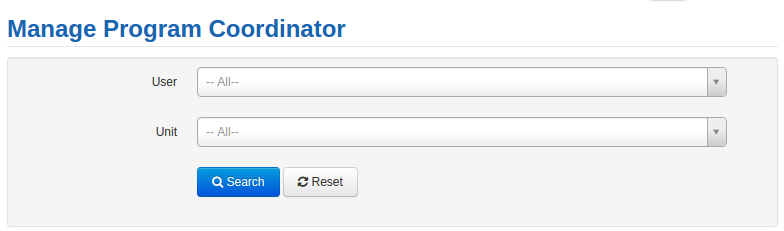
1. You can search for any Program Coordinator using the search bar for user and unit.
2. You can edit or delete any Program Coordinator using Edit or Delete button present on the right-hand side under Actions.

Adding Program Coordinator through Admin
1. In Admin, select User Unit Role present under Manage User & Roles from the sidebar.
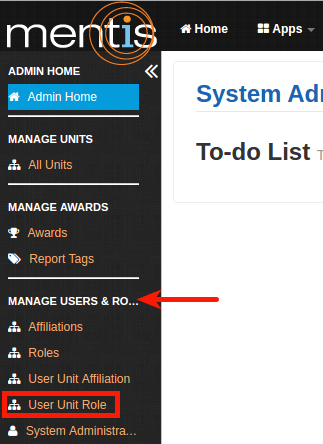
2. Click on +Add button present on the right-hand side.

3. In Create a new User Unit Role, you need to select a User (1), Unit (2), Role (3) as Program Coordinator and affiliation (5) as Faculty.
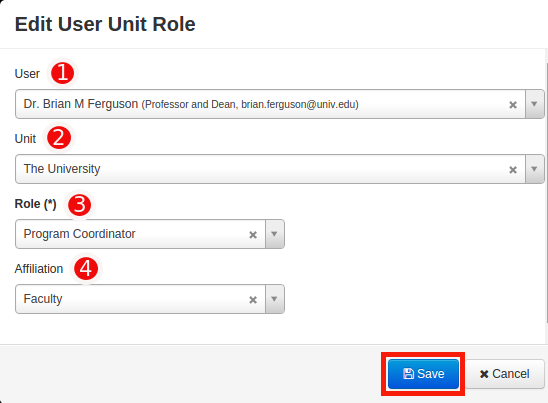
4. Click on Save. This will be displayed as Program Coordinator.
Note: You can edit or delete program coordinator using Edit or Delete button present on the right-hand side under Actions. A user can be added as Program Coordinator for only one unit.
|
Note: From Version 2.9.4 and above, Program Coordinator does not automatically get admin privileges, but can access all manage pages except Data and Employment Footprint which include - State Agencies Manage Page, State Activities Manage Page, NC SARA States Manage Page. Data pages are restricted to program coordinators which include Authorization Status Manage Page, Expense Categories Manage Page, Document Categories Manage Page and Physical Presence Manage Page. Program coordiantor can access ELC Dashboard along with State Authorization Report, NC SARA States Report, Physical Presence Report, Student Enrollment Report, State Agency Report, State Activity Report and Expense Report. |
Comments
0 comments
Please sign in to leave a comment.